usingUpdated 22 Jul 20264 min read
Finding matches
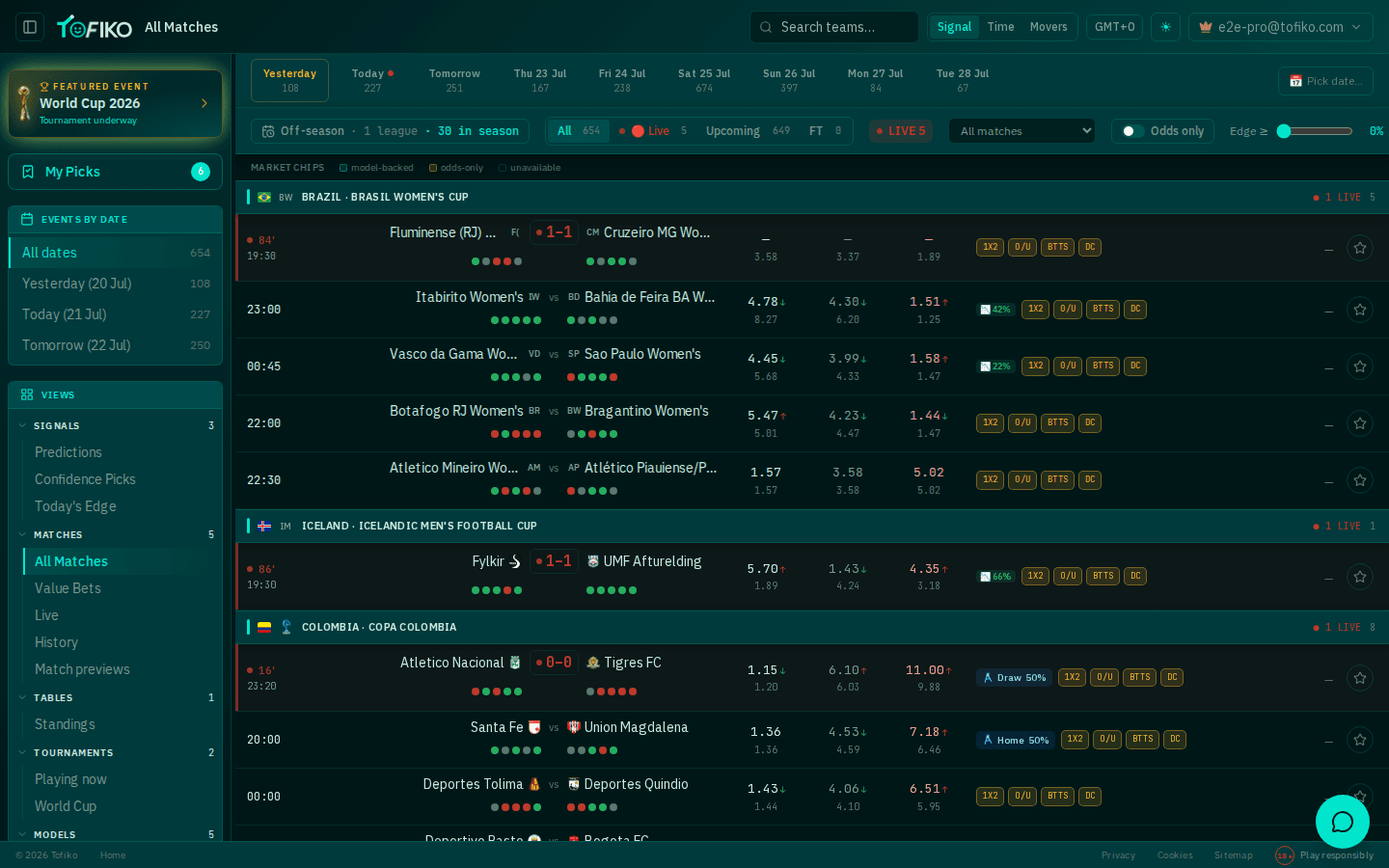
All Matches is the main schedule screen: every fixture Tofiko has data for, grouped by country and competition, with prices and model probabilities on the same row. This page explains each control and when you would reach for it.
Pick a day first#
The date strip runs across the top: All dates, Yesterday, Today, Tomorrow, then named days ahead. Each entry carries its own fixture count, so you can see before you click whether a day is worth opening.
Start here, because every other filter works inside the day you have chosen. Use All dates when you are looking for a specific fixture and do not know when it falls.
Under the strip is a season summary line — something like "Off-season · 1 League · 30 in season". It is the fastest honest answer to "why is this so quiet?".
Most northern-hemisphere leagues are between campaigns in June and July. Thin fixture counts and a low "in season" number are the calendar, not a fault. If a screen looks empty at other times of year, see troubleshooting.
Narrow the list#
Four controls sit under the date strip. Use them in this order:
- Status filters — All / Live / Upcoming / FT. A live count sits alongside them. Upcoming is the one to use when you are looking for something to bet; FT when you are checking results; Live when a match is in play (see live scores for what updates in real time).
- The league dropdown (labelled "All matches"). Pick a single competition when you follow one league closely and the rest is noise.
- The Odds only toggle. Hides fixtures with no prices attached. Turn it on when you want a shortlist you could actually stake, off when you want the full schedule.
- The Edge ≥ slider, from 0% upward. Drag it up to keep only rows where the model's probability sits far enough above the price. Leave it at 0% for browsing. Be careful with high settings — a big number on a thin league is more often a data artefact than an opportunity, which is the trap value betting warns about.
The market chips legend explains the row badges: model-backed, odds-only and unavailable. Odds-only means Tofiko has a price but no fitted model for that league yet.
Change how rows are ordered#
The top bar carries a display-mode switch with three settings:
- Signal — leads with the model's read on each fixture. Use it when you want the strongest opinions first.
- Time — plain chronological order. Use it when you are planning a day's viewing or need the next kick-off.
- Movers — surfaces fixtures whose prices have shifted. Each odds column already shows the previous price beneath the current one with an up or down arrow; Movers pulls those to the front. Price movement is information, and it is the raw material behind closing line value.
Find one specific match#
Two more top-bar controls:
- Team search — type a club name to jump straight to its fixtures, rather than hunting through country groups.
- Timezone selector — set your own offset (for example GMT+0). Every kick-off time, and the day a fixture is filed under, follows this setting. Worth setting once before you rely on the date strip.
What to do next#
Once you have found a fixture, the row itself carries most of what you need — teams, form dots, three odds columns and the model badge. Reading a match row breaks down each element. For a fuller write-up, open the fixture's public preview page from /predictions, covered in match previews.
None of these controls rank bets by quality. Tofiko's own performance page is blunt about the current state: the market is still ahead of the models on 1X2, and no league group yet clears the profitability gate. Use the filters to save time, then judge each price yourself.
Related
Frequently asked questions
Why does the match list look so empty?
Most likely because the northern-hemisphere season is between campaigns. The date strip shows a fixture count per day and the season summary line shows how many leagues are currently in season, so you can confirm it at a glance. In July that number is usually small.
What does the Odds only toggle do?
It hides rows that have no bookmaker prices attached. Use it when you are shopping for a bet rather than browsing the schedule, so you only see fixtures you could actually price.
Why do some rows have odds but no model percentage?
The models do not cover every league. Rows the model has not fitted are marked odds-only in the market chips legend. You still get the market price, just no model probability alongside it.
Can I change the kick-off times to my own clock?
Yes. The timezone selector in the top bar sets the clock used everywhere in the app, including the date strip and every kick-off time in the list.