supportUpdated 2 Sept 20265 min read
Troubleshooting: empty screens and odd states
Most "something's broken" moments on Tofiko are not bugs. They are the product refusing to show you something it cannot honestly show. This page covers each of those states: what you are seeing, why it happens, and what to do.
When Tofiko has nothing trustworthy to display, it displays nothing. An empty panel is usually a deliberate refusal rather than a failure — and the reason is always one of the few listed below.
Quick index#
| What you see | Most likely cause | What to do |
|---|---|---|
| Find value or Value Bets looks bare | Free plan, off-season, or a filter | Check the plan, then the date strip |
| A whole view looks bare in July | Northern-hemisphere off-season | Check the season summary line |
| Odds shown, no model percentage | League not covered by the model | Read it as an odds-only row |
| Live score frozen, or match gone | Feed dropped or reverted | Wait; treat the score as unconfirmed |
| Signed in, panels still locked | Plan level, or stale session | Refresh, then check your plan |
| Can't find a fixture | Wrong day, filter or timezone | Use the search box and date strip |
Find value or Value Bets looks bare#
What you're seeing. The Find value tab in My Picks shows only a few rows and no numbers, or the Value Bets view under Matches will not open at all.
Why. These are two different screens with two different causes.
Find value is not gated by league. It lists every upcoming fixture we cover that also has a price, ranked by how far the model's number sits from the bookmaker's, with each league's measured record shown beside the row. On a free plan it lists three fixtures and the side the model favours, without the probabilities. It is genuinely short in the off-season, when few leagues are playing.
Value Bets under Matches is a paid view. On a free account it is locked, not empty. That is a plan boundary rather than missing data.
Worth knowing either way. The gap those screens rank by is a disagreement between our number and the bookmaker's — not a forecast of profit. On the Performance page the market's Brier score on 1X2 is currently better than the model's, and no league group passes the profitability gate. We show you the disagreement and the record behind it; the judgement stays yours.
What to do. Check your plan first, then the date strip — most bare screens in June and July are the off-season rather than a fault. Manual pick logging always works: use + Log a pick in My Picks as normal.
A whole view looks empty in July#
What you're seeing. Few or no fixtures, across several views at once.
Why. The northern-hemisphere season is between campaigns. There genuinely are almost no matches.
What to do. Look at the season summary line above the fixture list — it reads something like "Off-season · 1 League · 30 in season" and tells you how much football actually exists today. The date strip along the top carries a fixture count for each day, so you can jump straight to a day that has games rather than scrolling an empty list.
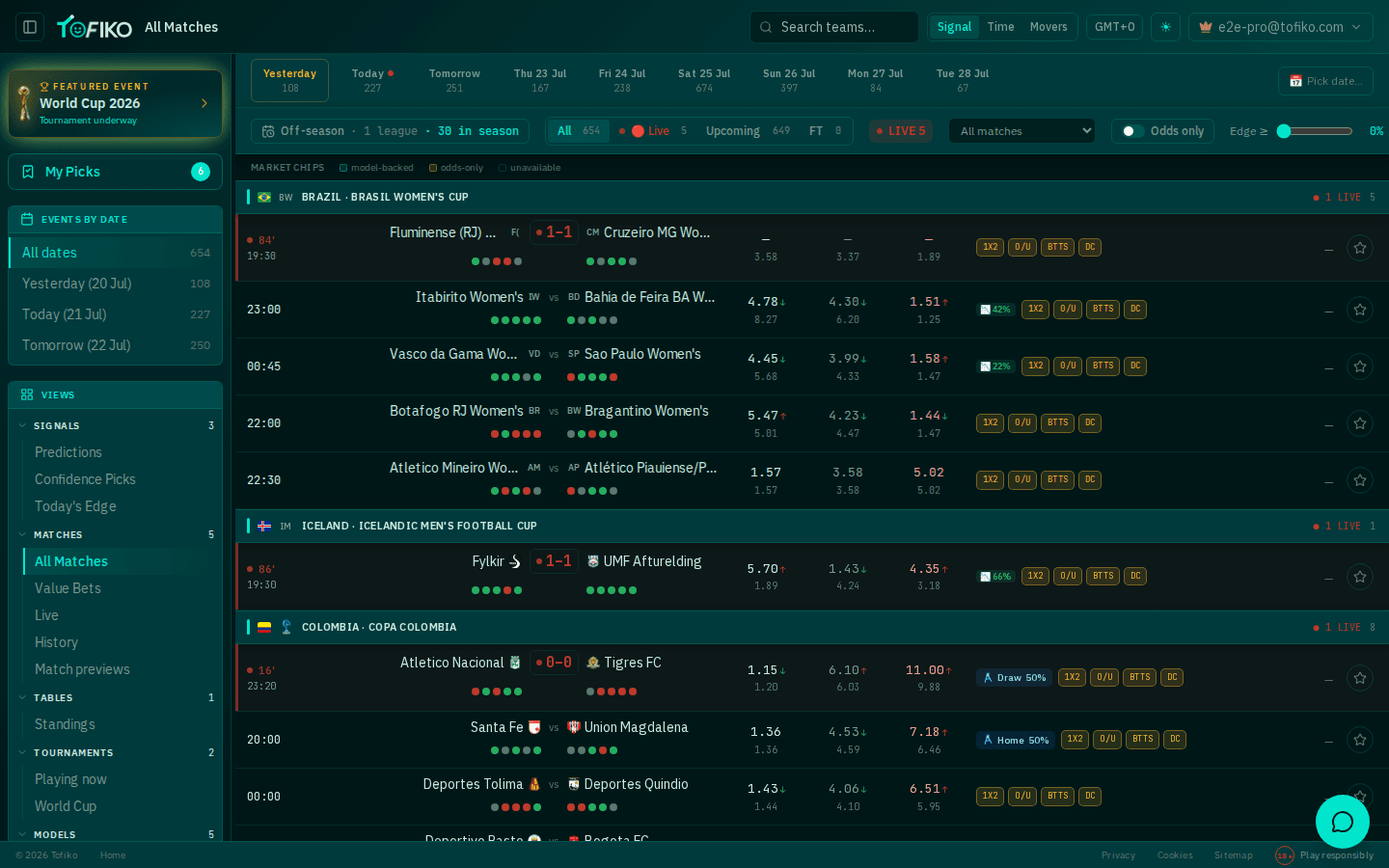
A match has odds but no model percentage#
What you're seeing. A row with three odds columns but no probability badge.
Why. The model does not cover that league yet. Coverage is not universal — see data and updates for how league coverage works and why it varies.
What to do. Check the market chips legend, which marks rows as model-backed, odds-only or unavailable. An odds-only row is still useful: you have the market's price and its movement, you just have no independent estimate to compare it against. If you want to form your own, how our models work explains what goes into one.
A live score looks stuck, or a match has vanished#
What you're seeing. A minute or score that has not moved for a long time, or a fixture that disappears from the live list mid-match.
Why. Live feeds occasionally drop out or revert a score they previously reported. When that happens we withdraw the live claim rather than keep showing a figure we can no longer stand behind. A missing row means "we no longer know", not "the match ended".
What to do. Treat the last shown score as unconfirmed and check the fixture again shortly. Do not resolve a bet in your journal on the strength of a frozen score — wait for the settled result before using Resolve on an open bet.
Two smaller ones#
Signed in, but panels are still locked. Either your plan does not include that layer, or the page is holding an old session state. Refresh first, then check the plan in your account menu: the value and analytic layer — de-vigged market percentages, edges, fair odds, the score matrix — needs PRO, and the external signal layer needs MAX. Match detail sections such as stats, events, form, line-ups and head-to-head are never restricted by plan, so if those are missing it is a data gap rather than a paywall. See plans and billing.
A fixture you can't find. Work through this in order:
- Search the team in the top-bar search box — the fastest route.
- Check the day. The date strip defaults to a single day; try All dates, or the neighbouring days.
- Check your timezone selector. A late kick-off can sit on the following day in your local time.
- Clear the filters. The status filter (All / Live / Upcoming / FT), the league dropdown, the Odds only toggle and the Edge ≥ slider all hide rows. An Edge slider above 0% is an easy one to forget.
A genuinely broken screen looks different: no data anywhere, on a day the date strip says has fixtures. Everything else on this page is the product being cautious on purpose.
Related
Frequently asked questions
Why does Find value look bare?
On a free plan it lists three fixtures and withholds the probabilities, and the Value Bets view under Matches is locked entirely. On a paid plan neither is gated by league — the usual cause of a short list is then the off-season or a filter, not a fault.
Why does the whole app look empty in July?
Most northern-hemisphere leagues are between seasons. The season summary line above the fixture list tells you how many leagues are actually in season, and the date strip shows the fixture count for each day.
Why does a match show odds but no model probability?
The model doesn't cover that league yet. Those rows are marked odds-only in the market chips legend. You can still see and use the prices; there just isn't a model estimate to compare them against.
I subscribed but panels are still locked. What now?
Refresh the page so your account state is re-read, and check the plan shown in your account menu. Value-layer panels need PRO, and the external signal layer needs MAX.