usingUpdated 22 Jul 20264 min read
Tracking your bets
Tracking is the part most bettors skip, and it is the only part that tells you the truth. This page walks the loop in My Picks: log, resolve, read.
Why bother at all#
Because without a record you cannot tell a real edge from a good fortnight.
- A season of results proves very little. The number of bets needed to distinguish a small edge from noise is far larger than most people assume — sample size puts real numbers on it.
- Profit is the slowest possible signal. Closing line value — whether the price you took was better than the price the match closed at — converges much faster, which is why Tofiko grades its own models on CLV, calibration and Brier score rather than ROI.
- Memory flatters. A journal does not.
If you want to check individual bets as you go, the CLV calculator will compare your price to the closing price for you.
Step 1 — log the pick#
Hit + Log a pick and enter four things:
- Fixture — the match.
- Selection — what you backed, for example Home, BTTS: Yes, or Over 2.5.
- Price — the odds you actually got, not the odds you saw earlier.
- Stake — the amount risked.
Log it at the moment you place it. Prices move, and a stake reconstructed from memory a week later is a story rather than data. If you are still deciding, star the fixture into the Watchlist instead — watchlist entries carry no stake and never touch your balance.
Not the best price you found, not the price on the screenshot. The whole value of the journal rests on the numbers in it being the ones that really happened.
Step 2 — find it under Open bets#
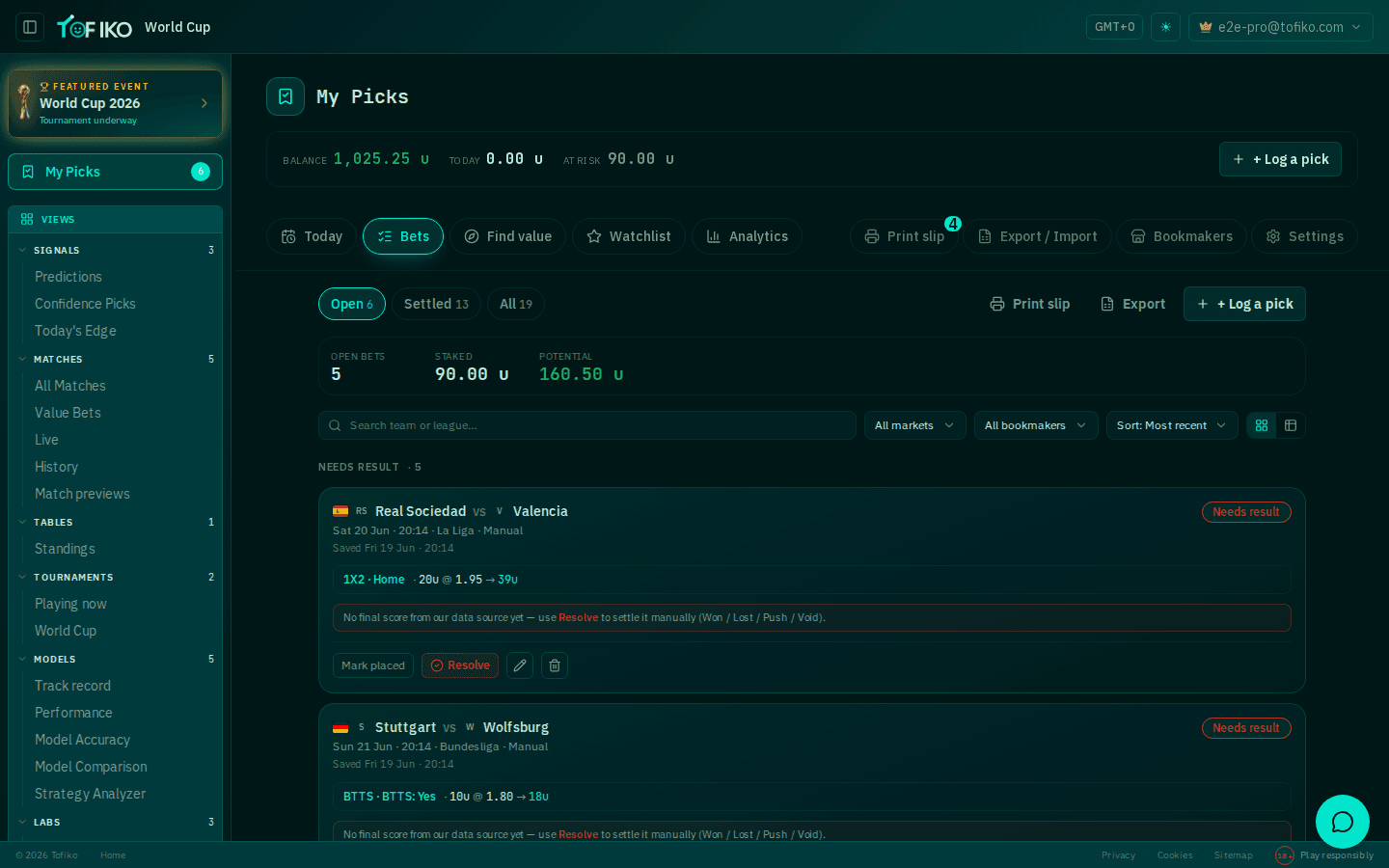
New picks appear in the Bets tab as open bets, showing fixture, selection and price together — "Home @1.95", "BTTS: Yes @1.8", "Over 2.5 @1.75". The header updates too: the stake counts toward At risk until the bet settles.
The dashboard strip flags unsettled bets with an "N need result" prompt on the Active tile, so you can see at a glance when there is housekeeping to do.
Step 3 — resolve when the match settles#
Every open bet carries a Resolve button. Use it once the match is graded. Resolving moves the bet out of the open list, applies the outcome to your balance, and updates Balance, Today and At risk.
Resolve promptly. Unresolved bets make At risk meaningless and hold your ROI hostage to a fixture that finished last Tuesday. If a match looks stuck or a result never seems to land, check live scores for how feeds behave, then troubleshooting.
Step 4 — read Analytics#
The Analytics tab turns settled bets into a breakdown rather than a single headline figure. It is where you look for patterns: which markets you actually do well in, which you keep losing in, whether your stakes are consistent with your bankroll management.
Your ROI is a record of what happened, not proof of skill. Tofiko applies the same standard to itself: the performance page reports that the market is currently ahead of the models on 1X2, and that 0 of 17 league groups pass the profitability gate. A tracker that flatters you is worse than none.
The supporting tabs#
- Export / Import — download your journal as a file, or read one back in. Use it for backups, to move between devices, or to analyse your bets in a spreadsheet. Export before any big change to your setup.
- Print slip — a printable summary of the day's selections. Useful if you place bets in a shop, or want a paper record next to the television.
- Watchlist — fixtures you are interested in, without a stake. Move them into a logged bet once you have a price you like; delete the rest without guilt.
- Bookmakers — record which books you use, so each bet is filed against the right one. Over time this shows you where you are consistently getting the better price, which matters more than most people credit.
Related
Frequently asked questions
What happens when I hit Resolve?
The bet moves out of the open list and its outcome is applied to your balance, so Balance, Today and At risk all update. Resolved bets then feed the Analytics tab.
Should I record the closing price as well as the price I took?
Yes, if you want an early read on whether you are doing anything right. The gap between your price and the closing price converges far faster than profit does — see the guide to closing line value.
How do I move my journal to another device or tool?
Use the Export / Import tab in My Picks. Export gives you a file of your journal; import reads one back in. It is also the simplest way to keep a backup.
What is the difference between the Watchlist and a logged bet?
A watchlist entry is a fixture you are interested in but have not staked. A logged bet has a selection, a price and a stake, and affects your balance. Watchlist items never do.